New Website Feedback
-
For Kokoro Connect in my library, Asu Random should be volumes 9 & 10, and those are curiously the only volumes to say "volume" albeit with wrong info.
Also Faraway Paladin Torch Port Ensemble is technically volume 5 (4 narratively).

Finally, I'd like to suggest having a dropdown box on the series tab to choose how many items to display. Currently it's locked to 10, but it'd be nice to be able to change it to maybe 20, 50, 100, etc.
-
The new reader is good, and I like the narrow page option.
But the absence of the Crimson Text font makes me still use old site. -
@Choubugioxkei said in New Website Feedback:
The new website won't load at all on my phone on Chrome. AdBlock browser works, but I rarely use that.
Android 8.1, Blackberry KeyOne. Chrome's up-to-date.
This issue persists. To be more specific, it sits on the loading screen with the circle, forever.
-
About the reader:
The page width seems to be slightly too wide in one page mode and slightly too narrow in two page mode. I would widen the two page mode page width so that the ratio of the page would more closely match printed book's pages and then narrowing the one page mode page width to match one page width in two page mode. Even better would be to allow each user to decide it themselves and make it adjustable.
I agree with other people that the default font size is slightly too small. It's good that we can adjust it as we want to, so this is not a huge problem, but shouldn't the defaults be something that most people would not have to touch at all?
Why did you remove the future books from series page? They were really nice to have and quickly see the Japanese release dates of future books. Just don't give us the full names of future volumes since they might spoil stuff and also make the cover pages remain blurred even on mouse hover. I really liked having the Japanese release dates listed there, so this seems like you are taking away something nice we had to solve a small problem instead of making small tweaks to it to make it golden.
-
@Tube said in New Website Feedback:
Why did you remove the future books from series page? They were really nice to have and quickly see the Japanese release dates of future books. Just don't give us the full names of future volumes since they might spoil stuff and also make the cover pages remain blurred even on mouse hover. I really liked having the Japanese release dates listed there, so this seems like you are taking away something nice we had to solve a small problem instead of making small tweaks to it to make it golden.
It's a legal issue. J-Novel Club doesn't have the rights to every volume of every series, and when JNC do get the rights to any one volume (they have to be licensed individually and sometimes in batches) is not always announced until it starts streaming the prepubs. You can always copy the Japanese title available on every series page and paste it into the Bookwalker Japan store and see all the volumes available there.
-
@LegitPancake Telling that there exists more books of a series does not require license for it. Like Wikipedia lists the Japanese volumes, and I am quite certain Wikipedia is not licensing any volumes. Cover images might not be as clear of a deal, but even they might fall under the same fair use doctrines, especially so if displayed at a low enough resolution, and even more so if they would just be blurred versions.
-
@Tube Japan does not have Fair Use laws (I believe), and J-Novel Club is not a Wikipedia/database website.
Telling that there exists more books of a series does not require license for it.
How do you know that? Have you seen the contracts? We do not have access to such legal information, so we can't jump to conclusions. No other publisher shows unlicensed volumes on their website. Also it's been said by staff members that having those volumes give customers an unspoken promise that JNC is guaranteed to translate them, and giving such promises is never a good idea.
-
I think the new design looks nicer and better functionality wise, but the reader could use more work. I very much prefer the old design of the reader, one page, narrow width and Crimson Text font.
By the way, opening Calendar page from a bookmark or in a new tab breaks the layout completely somehow. This is in Chrome browser.
Screenshot: -
@LegitPancake said in New Website Feedback:
Japan does not have Fair Use laws
Good thing JNC is an American company and must thus comply to American copyright laws. Ascendance of a Bookworm gets the same protection in every country that a piece of literature written in that country would enjoy, not the protection it would enjoy in its country of origin.
@LegitPancake said in New Website Feedback:
How do you know that? Have you seen the contracts?
No, I just have seen enough contracts to know that they hardly ever contain random clauses that prevent the other contract party to list encyclopedic, truthful content about the other contract partner. Also the fact that the information was already available on the beta site implies that there are no contractual restictions in place. I also did not say that it is impossible to contractually agree something like that, only that making a list of books does not require a license. Assuming that such random clause does exist with no evidence and asserting for certain that it must be a legal issue is the odd thing to do here.
@LegitPancake said in New Website Feedback:
Also it's been said by staff members that having those volumes give customers an unspoken promise that JNC is guaranteed to translate them, and giving such promises is never a good idea.
That is another thing, and might be actually a somewhat good reason to not list them. (Not the "I feel like it must be a legal issue." Not every problem in the world is a legal one.) However, with JNC never having stopped a series so far (as far as I know) the unspoken promise is already in the air, no avoiding it now. Might as well also make a use of a useful feature they already have the code for.
-
The new site is nice but for reading I prefer the old version of the reader. I hope it will continue to be available for future releases as well.
-
Please stop this back and forth.
A point was brought up and a suggestion was made, at this point it will be at J-Novel Club’s discretion on what will happen.
Going back and forth without full knowledge of the situation will get us all nowhere.
-
@Arindel I am having the same problem with the Calendar page when I go to the site from my favorites bar. I use Microsoft Edge. The error seems to be confined to only Mar 15 through Mar 18
-
Regarding the future volumes, I would like to know they're out there on the page (series marked as ongoing maybe?), but at the same time, I'm not sure I'd want the book covers to be posted, depending on the series that could lead to some serious inadvertent spoilers.
On a similar note, the series filter lets you filter complete or completed/hiatus series, but there's nothing on the series page itself that indicates if the series is actually complete, ongoing or on hiatus and I think it would be nice to have that if possible.
-
@Choubugioxkei There is no loading circle on the new website. Could you try clearing your cache or hard refreshing the page?
-
Ha, clearing my cache fixed it! Sorry for the trouble!
-
@Arindel said in New Website Feedback:
By the way, opening Calendar page from a bookmark or in a new tab breaks the layout completely somehow. This is in Chrome browser.
@thefirstpunicwar said in New Website Feedback:
@Arindel I am having the same problem with the Calendar page when I go to the site from my favorites bar. I use Microsoft Edge. The error seems to be confined to only Mar 15 through Mar 18
It's broader. I've confirmed it on Edge/FF/Chrome on desktop, as well as Safari/FF/Chrome on iOS. This bug happens whenever the calendar page is the first page you load. If you switch to another page and return, it will show correctly. You can get the bug to show up on other months as well, if you force a hard refresh in your browser (typically by holding CTRL while hitting F5) while viewing that month or just load future months from a direct link to it, and even on just this month it tends to also affect the 6th and the 28th.
What I suspect is happening is that the code that parses the raw calendar data into what we see on the page gets stuck when the data isn't available in the pre-loaded content (due to it being a fresh page load) so it has to cancel the action, then the process that catches that and invokes the parsing again is where the bug is actually located. But if you loaded any other page first (including another month from the calendar), or even go back/forth one month in the calendar, then the information is already stored in the browser so it doesn't have to use a cancel/redo process to load things correctly.
This can occur because the website is what's known as a "single-page app" (SPA) developed in Next.js (a subset of another popular Web UI framework called React.js). In SPAs, as much of the site content as possible is loaded right away, but kept stored in a raw data form in your browser's memory. Then, as you browse around the site, what is really happening is that the scripts that control how the site works update what gets displayed from all that stored data. This creates a rich, reactive web experience with almost no delay between parts of the site as you move around because it doesn't have to keep talking to the server to get new data.
-
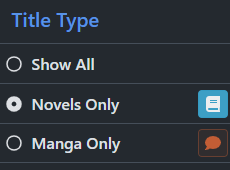
@DarkRookie We will be fixing the calendar issues, as well as adding a narrow width for the single page view in the reader. For point #4, you can use the sidebar (menu on mobile) to exclude manga:
-
@Silverleaf said in New Website Feedback:
Getting an odd bug in the reader - when I use arrow keys or click to turn the pages, it always skips the last page of the chapter and moves onto the next one. Dragging the slider to the end will make it display the last page, though.
Same here. Win 10/Firefox 86.0.1
After reading something captivating, book lovers simply need to talk about it with someone.
—Tearmoon Empire -
In the new reader (mobile), I'm consistently seeing the 'next' button for the last published chapters (e.g. bookworm p3v5p5 right now). I'd expect that to be similar to what it was in the old reader, with a notice of "you've read all there is for now" (or what it was). Showing this unresponsive 'next' button is confusing.
-
@Angelus said in New Website Feedback:
@Silverleaf said in New Website Feedback:
Getting an odd bug in the reader - when I use arrow keys or click to turn the pages, it always skips the last page of the chapter and moves onto the next one. Dragging the slider to the end will make it display the last page, though.
Same here. Win 10/Firefox 86.0.1
I was actually able to get through with the arrow keys on MacOS 10.14.6/Safari 14.0.3. However, scrolling was very frustrating. With a touch-surface mouse, you can scroll all four directions, but you get the same result either direction; which means you can't actually scroll the page if the top/bottom margins slip out of sight, unless you move outside the text area.
The lack of the 'Coming Soon' section on the new front page is even more frustrating when you've got several series to go through. With the old page, you could read the part, click the forum link to read any new posts, click the JNC logo to get back to the home page, then click the next series link to read. With the new front page, you have to click the JNC logo from the forums to return home, then click again to get the calendar.