J-Novel Club
    • Categories
    • Recent
    • Tags
    • Users
    • Login

    Forum new look?

    Scheduled Pinned Locked Moved Suggestions & Feedback
    65 Posts 20 Posters 1.2k Views
    Loading More Posts
    • Oldest to Newest
    • Newest to Oldest
    • Most Votes
    Reply
    • Reply as topic
    Log in to reply
    This topic has been deleted. Only users with topic management privileges can see it.
    • V
      Valanduin Premium Member
      last edited by

      Thank you to the forum team for working to improve the issues, I just tried a few different darker skins again and contrast and readability have greatly improved and they are mostly now readable, however text in quote blocks is still very low contrast with the "vapor" skin, the text is light blue and the quote block is slightly darker blue. I would include a screenshot but imgur does not appear to be working at the moment.

      Rahul BalagganR 1 Reply Last reply Reply Quote 2
      • jpwongJ
        jpwong Premium Member
        last edited by

        I'm kind of hoping the custom css overrides will be re-enabled again, though it's not the end of the world if they aren't

        1 Reply Last reply Reply Quote 0
        • Rahul BalagganR
          Rahul Balaggan Staff @Valanduin
          last edited by

          @Valanduin

          This should be fixed.

          Sorry but J-Novel Club does not publicly comment on any potential licensing decision or acquisitions.
          J-Novel Club, Future Volume Release Schedule
          Manga FAQ
          Premium Content List

          1 Reply Last reply Reply Quote 0
          • Rahul BalagganR
            Rahul Balaggan Staff
            last edited by

            notifications on mobile in the side bar should now be back.

            It will require a refresh

            Sorry but J-Novel Club does not publicly comment on any potential licensing decision or acquisitions.
            J-Novel Club, Future Volume Release Schedule
            Manga FAQ
            Premium Content List

            1 Reply Last reply Reply Quote 0
            • wanderer_1204W
              wanderer_1204 Premium Member
              last edited by

              "Unread" page seems to be broken. I get notifications about new posts on threads I am watching. But I used to see those also in the "unread" page before. Now I see some threads but not all.

              Rahul BalagganR 1 Reply Last reply Reply Quote 0
              • Rahul BalagganR
                Rahul Balaggan Staff @wanderer_1204
                last edited by

                @wanderer_1204

                I am afraid we can't reproduce this.

                I marked all topics as "read". Then I waited.

                A topic (Seafoam V2) has a new post. It is showing in unread for me, and in recent.

                Recent shows no other new post from when I marked all as unread.

                Sorry but J-Novel Club does not publicly comment on any potential licensing decision or acquisitions.
                J-Novel Club, Future Volume Release Schedule
                Manga FAQ
                Premium Content List

                wanderer_1204W 2 Replies Last reply Reply Quote 0
                • Paul NebelingP
                  Paul Nebeling Premium Member @Rahul Balaggan
                  last edited by

                  @Rahul-Balaggan Worked to open, but not to close.

                  1 Reply Last reply Reply Quote 1
                  • wanderer_1204W
                    wanderer_1204 Premium Member @Rahul Balaggan
                    last edited by

                    @Rahul-Balaggan i logged out of jnc and logged in again. I see the notification side bar with 12 notifications with many for new posts. I verified that I am indeed "watching" those threads and they show up in "recent" as unread - in bold and with blue bar on the left. But they don't show up on my unread page.
                    I still haven't cleared browser cache. Will try that and report here.

                    1 Reply Last reply Reply Quote 1
                    • L
                      Lex Member
                      last edited by

                      Notifications now seem to work for me on my tablet, thanks JNC for fixing that.

                      1 Reply Last reply Reply Quote 0
                      • kualiK
                        kuali Premium Member
                        last edited by

                        @Rahul-Balaggan Ran into one more today.

                        Setup for this bug:

                        • Use a screen wide enough you get the 'popup' post editor instead of the full-screen one.
                        • Go to a forum page with enough content to fill your screen vertically
                        • Close the post editor popup (either by making a post, editing a post, or hiding the editor)

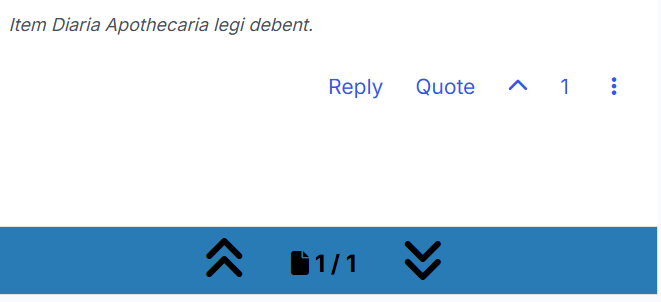
                        Up to 575 pixels wide, the 'your next/last post' shortcut is below the controls on the last post, and the full width of the display.
                        alt text
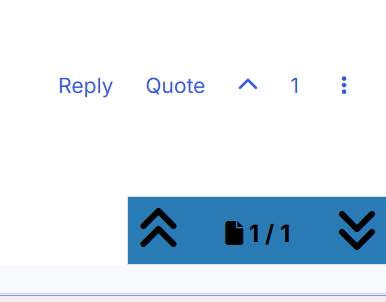
                        Up to 991 pixels wide, still beneath the controls, but over on the right instead of full-width.
                        alt text
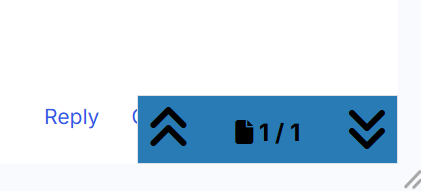
                        Above 991 pixels, it overlaps the controls (so long as the forum page you're on is at least 1 screen tall):
                        alt text
                        I need the render width to be over 1600 pixels before the controls are fully visible again - this last screenshot is at 1615 pixels wide.

                        alt text

                        If you haven't been through the post editor on that page, the page gives extra space below the last post for the shortcut to go. The post editor takes the space away again, but only for that particular width range.

                        (I just happened to run into this while commenting on a manga part today - with two windows side-by-side splitting my screen, they each get around 1200 pixels of width, landing me squarely in the unsweet zone.)

                        https://forums.j-novel.club/topic/6701/omnibus-builder
                        https://forums.j-novel.club/topic/5745/ascendance-of-a-bookworm-omnibus-editions

                        The Primal Desires: Food, Sleep, Sex, StroZero, Hypnotism, and Awayuki Kokorone.

                        Item Diaria Apothecaria legi debent.

                        1 Reply Last reply Reply Quote 2
                        • wanderer_1204W
                          wanderer_1204 Premium Member @Rahul Balaggan
                          last edited by

                          @Rahul-Balaggan Unfortunately clearing cache did not help. I have an example. I took a screenshot of my browser page with notifications and unread page. I see there are new posts in "long story short..." but I do not see the thread in my "unread" section. I verified and i am "watching" that thread. Like I said it is not with all the threads but only some of them - as you can that i do have some entries in my "unread" page.

                          Ok I am not able to post screenshots since I do not have enough rights to post them. Should I Email support?

                          Rahul BalagganR 1 Reply Last reply Reply Quote 0
                          • Rahul BalagganR
                            Rahul Balaggan Staff @wanderer_1204
                            last edited by

                            @wanderer_1204

                            Hi, you can hold off on the email for now.

                            I have reported this upwards, if they need examples they will let me know. Thanks. Sorry for the inconvenience.

                            But we do think that this only affects topics that are being followed.

                            If you want to see those topics in unread for now. You would have to unfollow them.

                            Sorry but J-Novel Club does not publicly comment on any potential licensing decision or acquisitions.
                            J-Novel Club, Future Volume Release Schedule
                            Manga FAQ
                            Premium Content List

                            1 Reply Last reply Reply Quote 0
                            • 1
                            • 2
                            • 3
                            • 4
                            • 4 / 4
                            • First post
                              Last post