New Website Feedback
-
Ha, clearing my cache fixed it! Sorry for the trouble!
-
@Arindel said in New Website Feedback:
By the way, opening Calendar page from a bookmark or in a new tab breaks the layout completely somehow. This is in Chrome browser.
@thefirstpunicwar said in New Website Feedback:
@Arindel I am having the same problem with the Calendar page when I go to the site from my favorites bar. I use Microsoft Edge. The error seems to be confined to only Mar 15 through Mar 18
It's broader. I've confirmed it on Edge/FF/Chrome on desktop, as well as Safari/FF/Chrome on iOS. This bug happens whenever the calendar page is the first page you load. If you switch to another page and return, it will show correctly. You can get the bug to show up on other months as well, if you force a hard refresh in your browser (typically by holding CTRL while hitting F5) while viewing that month or just load future months from a direct link to it, and even on just this month it tends to also affect the 6th and the 28th.
What I suspect is happening is that the code that parses the raw calendar data into what we see on the page gets stuck when the data isn't available in the pre-loaded content (due to it being a fresh page load) so it has to cancel the action, then the process that catches that and invokes the parsing again is where the bug is actually located. But if you loaded any other page first (including another month from the calendar), or even go back/forth one month in the calendar, then the information is already stored in the browser so it doesn't have to use a cancel/redo process to load things correctly.
This can occur because the website is what's known as a "single-page app" (SPA) developed in Next.js (a subset of another popular Web UI framework called React.js). In SPAs, as much of the site content as possible is loaded right away, but kept stored in a raw data form in your browser's memory. Then, as you browse around the site, what is really happening is that the scripts that control how the site works update what gets displayed from all that stored data. This creates a rich, reactive web experience with almost no delay between parts of the site as you move around because it doesn't have to keep talking to the server to get new data.
-
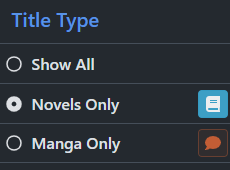
@DarkRookie We will be fixing the calendar issues, as well as adding a narrow width for the single page view in the reader. For point #4, you can use the sidebar (menu on mobile) to exclude manga:
-
@Silverleaf said in New Website Feedback:
Getting an odd bug in the reader - when I use arrow keys or click to turn the pages, it always skips the last page of the chapter and moves onto the next one. Dragging the slider to the end will make it display the last page, though.
Same here. Win 10/Firefox 86.0.1
After reading something captivating, book lovers simply need to talk about it with someone.
—Tearmoon Empire -
In the new reader (mobile), I'm consistently seeing the 'next' button for the last published chapters (e.g. bookworm p3v5p5 right now). I'd expect that to be similar to what it was in the old reader, with a notice of "you've read all there is for now" (or what it was). Showing this unresponsive 'next' button is confusing.
-
@Angelus said in New Website Feedback:
@Silverleaf said in New Website Feedback:
Getting an odd bug in the reader - when I use arrow keys or click to turn the pages, it always skips the last page of the chapter and moves onto the next one. Dragging the slider to the end will make it display the last page, though.
Same here. Win 10/Firefox 86.0.1
I was actually able to get through with the arrow keys on MacOS 10.14.6/Safari 14.0.3. However, scrolling was very frustrating. With a touch-surface mouse, you can scroll all four directions, but you get the same result either direction; which means you can't actually scroll the page if the top/bottom margins slip out of sight, unless you move outside the text area.
The lack of the 'Coming Soon' section on the new front page is even more frustrating when you've got several series to go through. With the old page, you could read the part, click the forum link to read any new posts, click the JNC logo to get back to the home page, then click the next series link to read. With the new front page, you have to click the JNC logo from the forums to return home, then click again to get the calendar.
-
Just posting a quick update that the Google SSO issue should be fixed, so please let us know if you're still experiencing issues logging in using "Log In With Google"!
-
@DarkRookie said in New Website Feedback:
-
The times on the Calendar are all kinds of wrong for me. They list at 19:00 and 23:00 for the most part. In my time zone, for the most part, they are released at 15:00 and 19:00. +1 for being 24 hr clock.
-
Option to sort by release time instead of alphabetically in the calendar.
Interesting. On chrome for me, all the times are correct for my time zone, and all the events are ordered by release time, with alphabetical only when multiple parts release at the same time. Could you check on chrome to see if it’s any different for you?
-
-
Please add tags to all the series which represent their original JP Publishers. Would be nice to know. Feel free to rip/copy from this page. https://www.reddit.com/r/LightNovels/wiki/publishers/jnc
-
@myskaros said in New Website Feedback:
Just posting a quick update that the Google SSO issue should be fixed, so please let us know if you're still experiencing issues logging in using "Log In With Google"!
Old website's Google SSO doesn't seem to work. Clicking it logins me to new website & if I go back to old website, I'm still logged out.
-
The more I try to use the new website, the more the fact that tapping the top browser bar on mobile doesn’t scroll to the top of a page is an issue. It makes it a lot harder to use the paginated series page in particular. Scrolling not hiding the browser bars is presumably related, but not as much of an issue.
-
Well as for feedback, new site seems really cool and nice to use. There are some minor stuff which i dont like but those are just personal taste :D Also idk is this the place but i just downloaded and checked the beta-app in IOS and i have to say that, the app also seems really easy to use compare to old one.
If you wonder the minor problems which i dont like, one i like to see the new release thing in home page like in old version. Also in reading part, i use arrows rather than mouse to change pages. So i would like to get rid of the mouse when i read but i cant. Another thing i would like to change the color of the text. So not very important stuff.
Thank you for your work, its a really nice website.
-
I just realized while using the new reader but the giant mouse cursor is finally gone and the part doesn't go back at the beginning anymore when turning to full screen and vice versa.
-
I had to move from the TestFlight app (which is now unusable for me) to the site reader, and I have to say the new site reader actually works really well on an iPad. It’s much better than the old one.
The only issue I’ve encountered is that flicking to get to the next page sometimes gets stuck around images, but tapping still works fine.
-
Here's a new issue I just noticed with Chrome on Windows 10: viewing the calendar on a monitor with a resolution of 1920x1080 everything is fine, but on another one with a resolution of 2560x1440 everything looks really messed up.
(Image of the issue inside the spoiler so people don't have to scroll past it. 😋)
-
@Terabyte That issue is also happening on Firefox at a 1080p resolution. Something in the calendar code is obviously borking when it tries to enumerate and list entries.
-
I noticed with the new launch of the site compared to when it was in beta you no longer see future volumes. I really enjoyed that aspect since it helped me to know what I have to look forward to.
Will this be coming back or will we have an option to enable it?
-
@jdmmis If you go back 2 or 3 pages, there's a whole discussion about that, but I think the short answer is, they're aware people would like it back and they'll make a decision on it at a later date having received the requested feedback.
-
In ~3 hours I Refuse to Be Your Enemy! Parts 1 & 2 are coming out and, while this is clearly obvious in the old site, the new calendar only show Part 1 coming out.
-
@jpwong Thank you for the answer and pointing me to the discussion.