J-Novel Club
    • Categories
    • Recent
    • Tags
    • Users
    • Login

    (New) App Feedback

    Scheduled Pinned Locked Moved Suggestions & Feedback
    629 Posts 183 Posters 594.2k Views
    Loading More Posts
    • Oldest to Newest
    • Newest to Oldest
    • Most Votes
    Reply
    • Reply as topic
    Log in to reply
    This topic has been deleted. Only users with topic management privileges can see it.
    • KhaosK
      Khaos Premium Member
      last edited by

      Was just wondering, if you're able to disclose, how high in priority is fixing paginated mode? This has been an issue since the launch of the beta and is the thing that bugs me the most.

      chocolatkeyC 1 Reply Last reply Reply Quote 0
      • chocolatkeyC
        chocolatkey Staff @Khaos
        last edited by

        @khaos pretty high priority. We plan on releasing a 1.0 in the near future, and part of that includes paginated mode working properly

        1 Reply Last reply Reply Quote 3
        • FireFistYKF
          FireFistYK
          last edited by FireFistYK

          The app freezes after 10-15 minutes of reading which reboots my phone. This has been happening since yesterday and happens everytime I read in 10-15 minutes intervals

          I never had any issues prior to this though and can't pinpoint why I just freezes and crashes

          I'm on the newest android (Samsung Galaxy S21) if that's of any importance

          myskarosM chocolatkeyC 2 Replies Last reply Reply Quote 0
          • myskarosM
            myskaros Staff @FireFistYK
            last edited by

            @firefistyk What device and OS version?

            Whoever said nothing's impossible never tried slamming a revolving door.

            FireFistYKF 1 Reply Last reply Reply Quote 0
            • chocolatkeyC
              chocolatkey Staff @FireFistYK
              last edited by

              @firefistyk this sounds like a pretty serious issue I don't think anyone else has had. More info would be appreciated.

              1 Reply Last reply Reply Quote 1
              • FireFistYKF
                FireFistYK @myskaros
                last edited by FireFistYK

                @myskaros Samsung Galaxy S21, Android 11

                @chocolatkey Yea I figured, anything I can do to give more info?

                I have a video showing that the app stops working and that my phone restarts if that's of any help

                chocolatkeyC 1 Reply Last reply Reply Quote 0
                • chocolatkeyC
                  chocolatkey Staff @FireFistYK
                  last edited by

                  @firefistyk if you could send this video to chocolatkey@j-novel.club that would be great

                  FireFistYKF 1 Reply Last reply Reply Quote 0
                  • FireFistYKF
                    FireFistYK @chocolatkey
                    last edited by

                    @chocolatkey said in (New) Beta App Feedback:

                    @firefistyk if you could send this video to chocolatkey@j-novel.club that would be great

                    Done, just write to me if it didn't arrive by any chance

                    1 Reply Last reply Reply Quote 0
                    • G
                      Genosis Member
                      last edited by Genosis

                      Top Left: Google Play Books Reader
                      Top Right: JNovel New App Dark Theme
                      Bottom Left: JNovel Old App Dark Theme
                      Bottom Right: Discord Dark Mode

                      Example

                      Left: Google Play Books Reader
                      Right: JNovel New App Dark Theme

                      Example 2

                      Hi, I would like to suggest lowering the contrast of white and black in the new app's dark/black theme.

                      Currently the app is using values that are either pure black(#000) and pure white(#FFF) or very close to it.

                      This is really harsh and fatiguing on the eyes while reading and generally should not be done. It's a well known principle in UX and UI design, so I am not trying to force a subjective opinion on the app.

                      https://uxmovement.com/content/why-you-should-never-use-pure-black-for-text-or-backgrounds/

                      https://graphicdesign.stackexchange.com/questions/25356/why-not-use-pure-black-000-and-pure-white-fff

                      These two links discusses the effects of using such high contrast, and the first one discusses in-depth the science behind this. (People with astigmatism will be affected even more by this)

                      While I would usually resort to gray theme, the gray from the gray theme is even brighter than the dark mode on discord, so it does not function well as a dark mode theme at all.

                      I hope the values are updated in future app versions (or even the web reader), since I frequently use the JNovel app to read. Thanks!

                      chocolatkeyC 1 Reply Last reply Reply Quote 2
                      • chocolatkeyC
                        chocolatkey Staff @Genosis
                        last edited by chocolatkey

                        @genosis now that this is on the forums, is there anyone who would not like it if the white text were to be slightly dimmed?

                        KhaosK J nofairytaleN 3 Replies Last reply Reply Quote 0
                        • KhaosK
                          Khaos Premium Member @chocolatkey
                          last edited by

                          @chocolatkey Is it possible to have someone sort of adjustment slider?

                          1 Reply Last reply Reply Quote 0
                          • MasterLillyclawM
                            MasterLillyclaw Premium Member
                            last edited by

                            Can't recall if I or anyone else has mentioned this before, but it would be nice to be able to tell from within the app whether a release is the final one for that volume or not. On the "Releases" page itself might be a bit crowded, so at least on the book's "Volume" page you can get to from long-pressing a release would be nice.

                            1 Reply Last reply Reply Quote 0
                            • J
                              jdmmis Premium Member @chocolatkey
                              last edited by

                              @chocolatkey I think it’s fine but I have my display around 45% brightness by default.

                              J 1 Reply Last reply Reply Quote 0
                              • J
                                jdmmis Premium Member @jdmmis
                                last edited by

                                @jdmmis
                                My Friend's Little Sister Has It In for Me! Volume 3 Part 4 had an issue with font.

                                I'm on iPhone 11 Pro with latest iOS version and app version.

                                alt text
                                alt text

                                myskarosM 1 Reply Last reply Reply Quote 0
                                • myskarosM
                                  myskaros Staff @jdmmis
                                  last edited by

                                  @jdmmis I think this was a case of the part being formatted incorrectly. I just made a change, can you try again?

                                  Whoever said nothing's impossible never tried slamming a revolving door.

                                  J 1 Reply Last reply Reply Quote 0
                                  • J
                                    jdmmis Premium Member @myskaros
                                    last edited by

                                    @myskaros Yes it looks like what I would expect it to be now. Thank you

                                    1 Reply Last reply Reply Quote 0
                                    • mirkospM
                                      mirkosp Premium Member
                                      last edited by

                                      I've been binge reading a lot on the app this week, un unhealthy amount of time even, and every two-three volumes worth of parts the app gets stuck in a "loading part..." mood when I'm trying to go to the next. Closing the part to go back to the volume (which brings the volume from where I started the binging session rather than the current volume, but I believe this is a known behavior) will only show the volume's header with no parts, and the same goes for the releases tab, with nothing showing up. I had thought it was an internet issue on my end the first time, or maybe the site having a temporary downtime, but with it happening every time I've since realized it's simply fixed if I close and reopen the app.
                                      To put a perspective on the amount of parts it does this after, I had started the latest binge on bookworm part 2 vol 3 part 6 (or 8?) and it got stuck in "loading part..." when trying to load part 3 vol 1 part 2.

                                      1 Reply Last reply Reply Quote 0
                                      • A
                                        aeonidon Member
                                        last edited by

                                        I got a new tablet (Lenovo Tab M8 FHD), and the app seem to think it's a lot smaller than it actually is. I only get 2 series/volume thumbnails per row now, and they're huge. On my old tablet, with roughly the same display size, there were 3.

                                        1 Reply Last reply Reply Quote 0
                                        • nofairytaleN
                                          nofairytale @chocolatkey
                                          last edited by

                                          @chocolatkey I'm fine with the white text slightly dimmed, but as an amoled phone user, I hope the option for pure black background will remain.

                                          1 Reply Last reply Reply Quote 2
                                          • HB_H
                                            HB_ Member
                                            last edited by

                                            Thank you so very much for this new up.
                                            I had downloaded your old app, and disliked it.

                                            Then I decided to check out your new one due to Bookworm and decided to join JNC.
                                            It's supper nifty and with intelligent design.
                                            My only concern with it is that it's a bit hard on the eyes to read even with black background/white text.

                                            I use CoolReader on my mobile phone and I find their background to much easier on the eyes. Here is a random google search image of what it looks like:
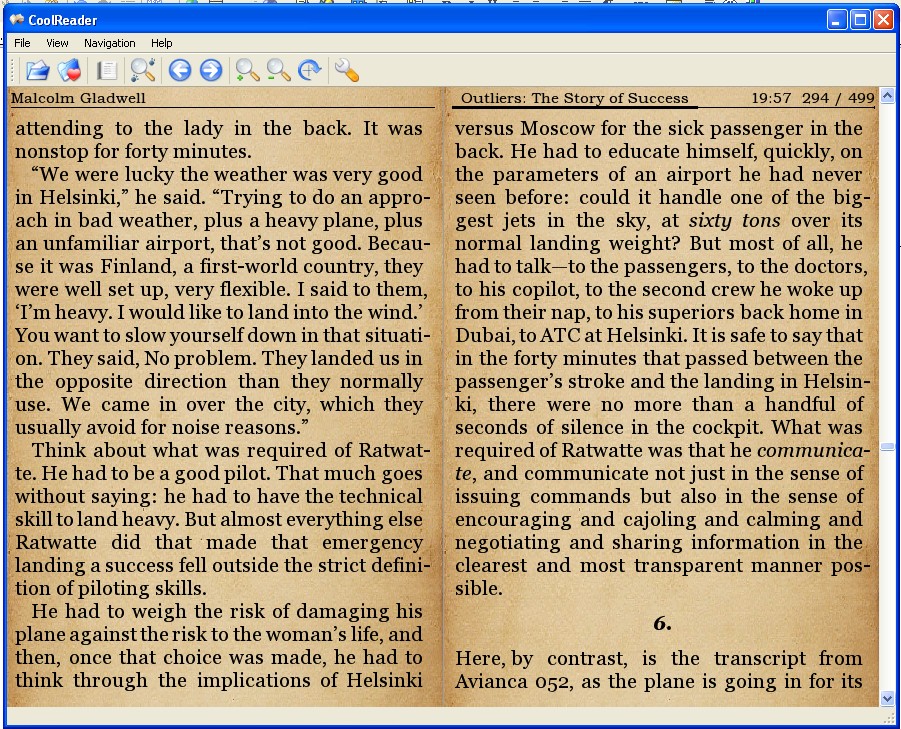
                                            alt text

                                            Please keep up the good work.

                                            1 Reply Last reply Reply Quote 1
                                            • 1
                                            • 2
                                            • 7
                                            • 8
                                            • 9
                                            • 10
                                            • 11
                                            • 31
                                            • 32
                                            • 9 / 32
                                            • First post
                                              Last post