(New) App Feedback
-
LDM v13p6 seems to be missing in the releases for me (myskaros helped confirm its not a global issue as he still sees it. I have tried restarting the app as well as refreshing (through the pull to refresh). Am on Android. The part does show in the series listing for LDM.
Me:

Mysk:

Edit: looking more closely now a few more are also missing, like Holmes and Kokoro Connect
-
@myskaros Coulda sworn I didn't see it in there :/ I checked it in the app and the first page before posting and still missed it FML.
It still gives the wrong chapter number though.
-
@Cibastian thanks for noticing that bug, it was a similar issue as the series page. It's been fixed
-
This post is deleted! -
On a lenovo android 7.1.1 tablet I find that the sizing is inconsistent between paginated and scrolling. For paginated 100% is OK but when switching to scrolling I need to shrink it to 60%. Italicised lettering does not appear to scale with non-italicised so they only match at 100%.
-
Using the Samsung Fold 2
-
When viewing images, they are not in the center, they tend to align to the left side leaves a big black space on the right. Hopefully it can be aligned to be in the center.

-
Some text font are bigger than other font for some reason.

-
-
Not sure if this has been brought up...but the thumbnails on android are partially cut off, on both top and bottom.
Here is a comparison between old app and new.
Don't think it's just my device, if you look a couple posts up at @Cibastian images, they are also cut off.
I suppose this could be by design, to fit more without scrolling, but I think I'd prefer a full thumbnail with less series showing.
-
A new beta release (0.2.0) has been sent to Apple and Google for approval.
Fixes:
- LN reader missing proper text styling (centered text etc.) - NOTE this applies to vertical reader, horizontal reader will be improved next build
- Paragraphs are not indented
- Italic/bold text does not scale properly
- Can't toggle interface/change page when pressing on image in novel reader
- Tile views can now have more items per row on wider screens
- Novel font selection doesn't work
- Reading direction not saved
- Filtering series by follows/catchups
- Tapping up/down in vertical scrolls a bit less ( @Nosgoroth )
- Various bugs
Next build, points so far for fixing:
- Fix horizontal novel reading
- Deal with expiring sessions
- Fully implement last page in reader
- Reader settings dialog fixes
- Progress sync issues when switching between parts
- more...
-
This post is deleted! -
- On iOS 14 I still have to set the font to like 350% on vertical in order for it to be readable.
- On the series page, I wish clicking only manga would be available without using the search button. Putting it in the filter would be better in my opinion.
- On that note, clicking "Only follows" makes the list infinitely scrolling. I can scroll down forever and it will never reach the bottom.
- Would be nice if the latest volumes would be at the top in a series page. Scrolling down 20 volumes every time I go to Smartphone is not ideal.
- Theme selection is still messed up on iPhone 8 iOS 14.
- Double manga spreads (or just every other page) should be stitched together when turning to landscape orientation. If you have access to the Shonen Jump app, that would be my preferred way to do it.
- On that note, personally I would prefer if all touch-to-turn-page would be turned off on manga, and only have swipe as the way to turn pages. That's how it is on the Shonen Jump app and in my opinion it helps make pinch-to-zoom less glitchy (and it is super glitchy here).
- Horizontal novel reading is almost unusable as you know so I don't even touch it. The font size seems to scale very differently from vertical.
- Lastly, I once again hope TTS will be considered in the future, as the current official app handles it almost perfectly (on iOS).
-
@sinnoaria Thanks for your feedback
On trying to view Following (filter): Exception: Failed loading series: DioError [DioErrorType.RESPONSE]: Http status error [500]
Will be fixed soon, won't require an app update
Images are cut off [...]
A screenshot of this noticeable effect would be appreciated. The covers on releases are still being cropped a bit on bottom/top, which is intentional since image ratio may vary, but any other cut off parts are an issue
Page length issue still exists
Text size difference
Seeing some pretty extreme lag in horizontal modeIt seems that was/is an issue on the horizontal novel reader, in which case I am going to be fixing the horizontal reader next build. I'll be checking on these issues, a list of devices would be appreciated
Seems a bit odd that the novel/manga and following/catchup filters are separate from each other
Design isn't final, will be improving it later on when important issues have been fixed
Menu should be overlay etc.
Yep, is planned
Status bar not disappearing
Screenshot appreciated, status bar should disappear. Am considering having navigation bar (at least on Android) disappear too when UI is hidden, since people have requested it.
Tap margins seem excessively large
Agreed, thinking of reducing the top/bottom/left/right fractions' defaults and adding a setting to change them with visual hint
@LegitPancake Thanks as well for the feedback
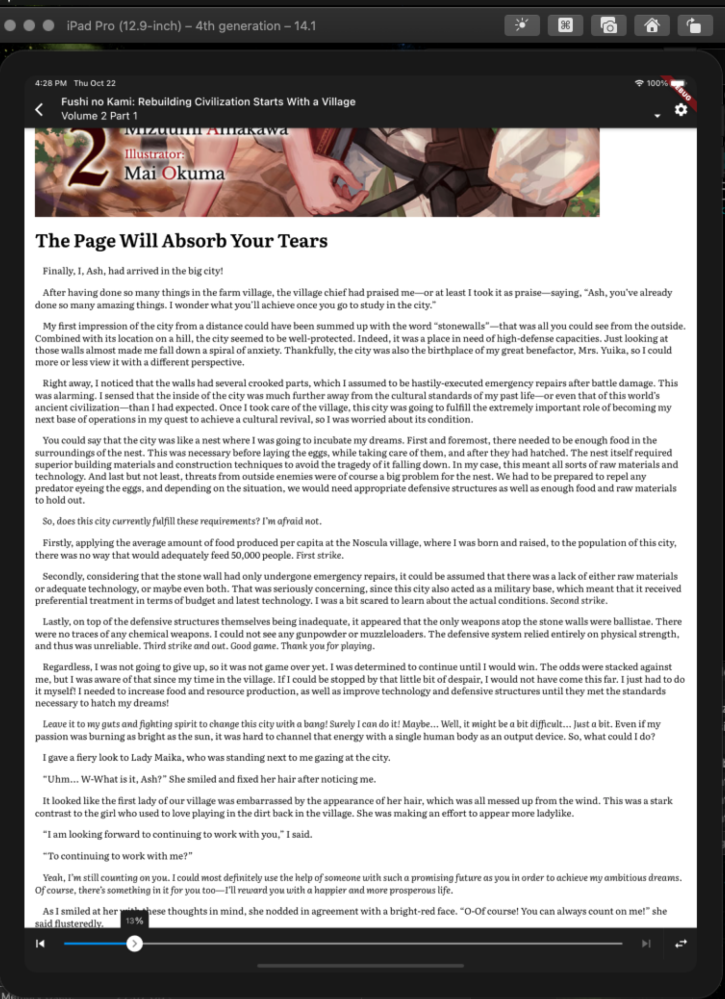
On iOS 14 I still have to set the font to like 350% on vertical in order for it to be readable
I'm going to be looking into different defaults based on the device size in the future. Default size looks like this in the simulator for an iPad
On that note, clicking "Only follows" makes the list infinitely scrolling
Probably a server-side bug, I'll look into it
Theme selection is still messed up on iPhone 8 iOS 14.
Still looking into this, a staff member with the same phone/software does not have this problem.
Double manga spreads (or just every other page) should be stitched together when turning to landscape orientation. If you have access to the Shonen Jump app, that would be my preferred way to do it.
Spread mode in landscape is planned for both novels and manga. Just not super high priority
Pinch-to-zoom is glitchy
Yes it is. Will be improved
Horizontal novel reading is almost unusable as you know so I don't even touch it.
Will be working on the horizontal reader for the next build
Lastly, I once again hope TTS will be considered in the future
It might be considered in a future build.
-
Voided Out as it was against the rules.
I will wait for there to be some method of posting images via the android app or other forms of reporting within the app.
-
@LegitPancake said in (New) Beta App Feedback:
Lastly, I once again hope TTS will be considered in the future, as the current official app handles it almost perfectly (on iOS).
My one and only request! Please don’t take away my favorite way to read the prepubs!
-
Hi
I just wanted to ask for a few things in the new app.
iPad/Android
- option to disable animated transitions in paginated view. Some people have motion sickness. In my case I just hate all of the animations. Please, allow to instantly switch pages like in old app.
- bring Spectral font from old app. If possible use system fonts on iOS to bring Iowan font.
- allow to set top, bottom, left/right margins. It has always been a bit uncomfortable to use old app because it just shows you a wall of text.
- optional info bar header/footer. Old app had % footer, but it can be larger.
Android
- there are a lot of punch hole devices. In case of Samsung ones the OS takes away that space at the top of the screen and renders it completely black. It doesn’t follow app background settings. This is visually annoying and the only way to compensate for that is to set black background in the app. If it is possible take control of that top strip to change its color and put header there.
- since the top part of the screen is taken away I'd like to compensate for it and add a huge bottom margin for symmetry.
- some of the devices have rounded screen corners. Currently bottom lines of text are affected by that rounding because text goes to the very bottom of the screen.
-
The following error shows up when using filters. Primarily in the series tab:
Exception: Failed loading series: DioError [DioErrorType.RESPONSE]: Http status error [500]
Has for about the last 15 hours now.
-
@Talian It should be fixed. Could you confirm please?
-
option to disable animated transitions
Yes, this is planned. I might even promote it to being available by the next build as a setting
bring Spectral font from old app. If possible use system fonts on iOS to bring Iowan font.
Until other features have been implemented and development has stabilized, we won't be sourcing fonts from anywhere besides google fonts (https://fonts.google.com/). Lowan is not there, however Spectral is, and I may consider adding it or swapping another font with it, however I would appreciate knowing why you like this font and/or if other users think this should be added.
allow to set top, bottom, left/right margins
planned
optional info bar header/footer. Old app had % footer, but it can be larger.
possibly later on, I don't want to adjust the reading interface too much until it's stable
there are a lot of punch hole devices. In case of Samsung ones the OS takes away that space at the top of the screen and renders it completely black. It doesn’t follow app background settings. This is visually annoying and the only way to compensate for that is to set black background in the app. If it is possible take control of that top strip to change its color and put header there.
since the top part of the screen is taken away I'd like to compensate for it and add a huge bottom margin for symmetry.I have that same problem on my Samsung phone with a hole punched through it, however I'm not sure what the appropriate alternative would be yet, since other ebook readers seem to do the same thing. There may be a specific Samsung API to "reclaim" that space, in which case it will have to wait for later
-
@chocolatkey it is now, thanks!
-
@chocolatkey said in (New) Beta App Feedback:
No ability to resume reading from previous location in LN reader - the LN reader should be automatically jumping you to last position. If it's not, that's a bug.
Currently it only seeks to the position from current startup (in both modes). Won't work if the app is restarted or if you read it elsewhere.

-
Entire (current) 4th volume of otherside "expired" in may. The app can open it from releases tab and declines to do it from the volume.
-
It's almost impossible to unfocus from login fields and you can't switch to a different tab while the keyboard is on. It's extra bad on iOS because there's no button to hide keyboard. The fields also control focus in an undesirable way (typing email and quickly switching to password will bring you back to the email field because it just finished validation or something).
-
Horizontal/vertical button is a bit confusing because it makes me think "arrows go sideways means that's how you flip and you're in horizontal mode now". I don't think you even need that there because it seems less important to have nearby than font size or color controls.
-
That option also needs to be separate for manga and novels.
-
Releases list consistently produces duplicates near data page boundaries. It's throwing things out too but that's harder to notice.
-
The splash screen should probably show the latest and installed version.
edit: One more thing that I wanted to bring up earlier than later: it would be nice if progress value corresponded to the percentage of the first character on screen (or the first character of the first paragraph because it's easier to implement) because that way having different page size (by switching to a different device or changing settings) will not change the start of viewport so there's no chance the word you were reading will be left behind (which I imagine is the worst scenario that can happen when imprecisely resuming).
-
-
This post is deleted!