J-Novel Club Monthly Updates Sept. 2021
-
@terabyte You can configure the recent page as your home page for the forum. I did that a year or so ago.
-
@someoldguy said in J-Novel Club Monthly Updates Sept. 2021:
@terabyte You can configure the recent page as your home page for the forum. I did that a year or so ago.
Terabyte is referring to the "Coming Soon/Recent" tabs on the release feed of the website homepage that was just implemented today!
-
Hey, barman, can I get some button padding over here? Just put it on my tab, you know I'm good for it.
-
Hello everyone
I got an issue, recently I cannot "follow" new books (or maybe the statut shown is not correct).
When I click on "follow" it's liked I selected the button but nothing is working.
If I check the network tab I see the next request
# A PUT operation
https://labs.j-novel.club/app/v1/me/follow/5f46eca7a4e1191968b8858e
# The answer is a 409 conflict
https://developer.mozilla.org/fr/docs/Web/HTTP/Status/409
I didn't verify the network tab for other browser, but I got the same behavior for Firefox (90 and 92) and Chromium with an empty profile (no extensions). If it can help, I'm on Linux.
If you need additional information or test, let me know
-
Most likely related to the above issue.
If I go to the Series List page, Unfollow button doesn't show up on the newer series that I followed even after I filtered to Followed series only.
When clicked these Follow buttons, it will do nothing (409 Conflict), but worked correctly to the unfollowed series.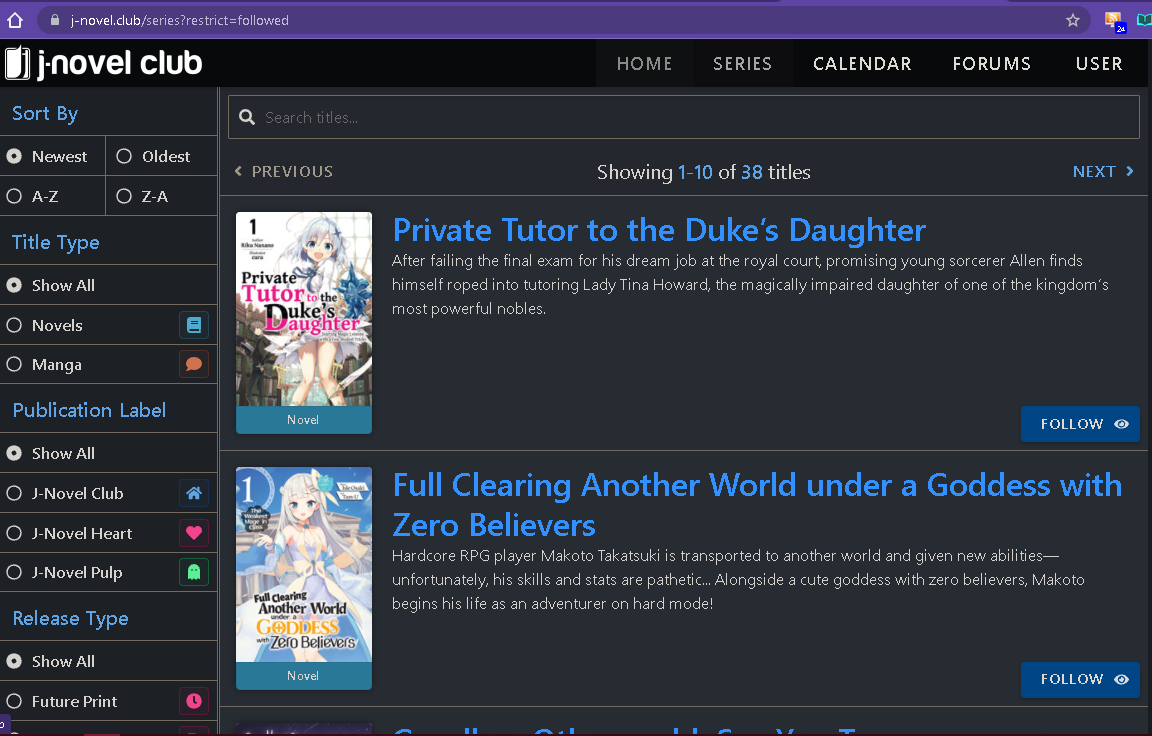
For some reason, it show Unfollow button if I tried to click the Next button after that Previous button. All Unfollow buttons worked here correctly.

Also, if you go to any specific followed series page, it will show the follow button instead of the Following button. Also will not work correctly and give (409 Conflict).
Worked normally for unfollowed series. -
I have an extension to the "follow button" problem.
I see everything that the two previous posts have shown, but strangely, pressing the apparently nonfunctional follow button still adds the series in question to the users RSS feed.
-
Thanks for all the reports on the Follow feature! We are investigating and will post an update when possible.
-
the manga reader seems to really hate my ipad mini on ios 15. Trying to read campfire cooking manga makes safari go into a reload loop and eventually crash with a message about too many errors. The same thing happens with Full Clearing manga. The LN reader seems fine. The loop happens with Firefox 37 as well.
The loop in Safari or FF can also crash my ipad making it difficult to test.
My iphone se with ios 15 doesn't go into this loop. I can load up Campfire Cooking and Full Clearing manga in Safari, go page-to-page and vertical scroll.
-
@yzh4rjdzob6 said in J-Novel Club Monthly Updates Sept. 2021:
The loop in Safari or FF can also crash my ipad making it difficult to test.
Switching browsers will rarely make any difference on an IOS device. They all use the safari engine under the hood, because Apple.
-
The crash loop manga reader is still there on ipad mini 5th gen on ios 15.0.1 with Firefox 38.0 and Safari. I have more time to test things out this time. The tests below is using Faraway Paladin manga.
This is with FF:
- ipad in portrait mode when the page loads (single page, side page advance): the loop appears.
- ipad in landscape mode when page loads (double page, side page advance): no loop! but tiny images make my eyes bleed...
- ipad in landscape on page load, switch to single page (still side page advance): no loop.
- ipad in landscape on page load, switch to single page, turn ipad to portrait mode: no loop.. for 5 - 6 pages, then crash.
- ipad in landscape on page load, turn ipad to portrait mode (reader automatically goes from double page landscape to single page portrait): no loop through end of chapter. I tried this with another chapter, so there shouldn't be any pages in history.
Using Safari, I get similar results as FF above, except the "switch to portrait" trick does not seem as reliable. I went through 2 chapters in FF without problems, but crashed first of 2 on safari. The safari crash was hard (restarted ipad), so maybe something in memory was cleared out letting the 2nd run complete.
As before, iphone se on 15.0.1 does not seem to have this crash, but I did not test as much due to the tiny screen.