(New) App Feedback
-
I tried it both on Wi-Fi and cellular (5G) and the same issue occurred. I’m on the app v3.4.0 and iOS 26.5. I tried powering off my phone and turning it back on but that didn’t do anything either.
Edit: The reader is set for horizontal (right to left) scrolling, and tapping the left side of the screen to turn the page causes the issue. However using the scroll bar on the bottom I can read everything. Also changing to vertical scrolling allows me to swipe up and down through all the content.
-
The new version of the app is displaying paragraphs with too much spacing in my opinion and the options for advanced reading settings are inaccessible because the settings pop up doesn’t scroll down. Also I really miss the option of turning the page by tapping the side instead of manually scrolling(not sure if this is an intentional removal or not).IOS
-
@jono just want to say I got the same issue as well. On Android ss well.
-
Hello,
Thank you all for taking the time to report this in.
We apologize for the inconvenience caused.
We have forwarded the issue to our development team for investigation.
We apologize again and ask for your patience as we address the issue.
-
Hello,
An update as been released on the app stores for the JNC app.
It may take a bit for it to appear in your update list but it has been released.
This should solve the issues with reading manga.
Thank you again for your patience and understanding.
Sorry but J-Novel Club does not publicly comment on any potential licensing decision or acquisitions.
J-Novel Club, Future Volume Release Schedule
Manga FAQ
Premium Content List -
@Rahul-Balaggan can confirm update is live & resolves the manga issue. thanks to all involved for the quick resolution
-
The new layout for the website off the app is really confusing
-
Couple of things:
-
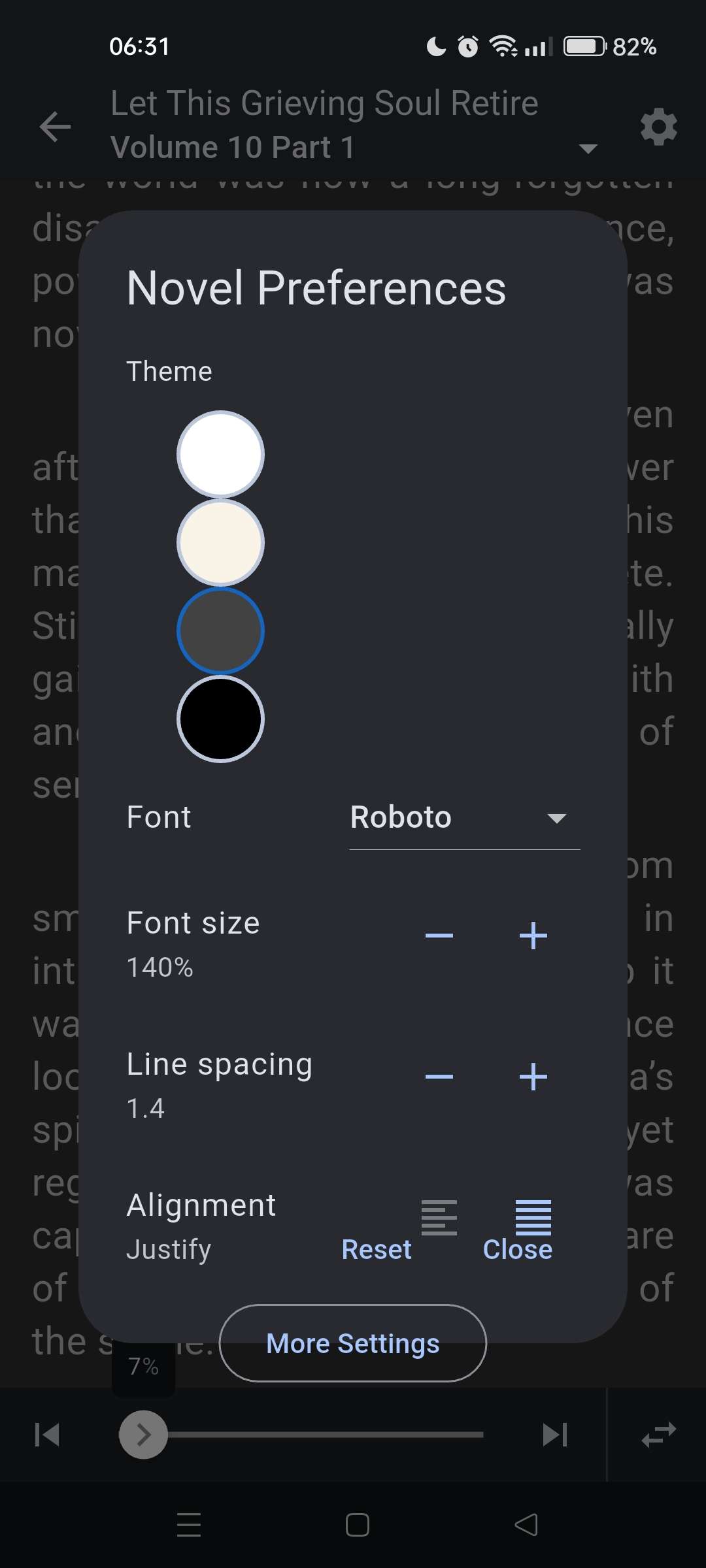
I previously reported it on Discord, but the Novel Preferences settings has issues on my end, the reset and close buttons are aligned such that I cannot change the Alignment option.
-
I would like a way to dynamically filter Unread/In Reading/Fully read parts in the Releases tab, if possible.
-
-
- Novel preferences: themes start too scrolled to the right, text wrapping is messed up, can't scroll the options
- On logout, the screen correctly shows the error, but shows a nonsensical "Retry" button that's just going to fail. Could it be changed to a "Login" button that's takes you to the login page?