J-Novel Club
    • Categories
    • Recent
    • Tags
    • Users
    • Login

    (New) App Feedback

    Scheduled Pinned Locked Moved Suggestions & Feedback
    629 Posts 183 Posters 592.3k Views
    Loading More Posts
    • Oldest to Newest
    • Newest to Oldest
    • Most Votes
    Reply
    • Reply as topic
    Log in to reply
    This topic has been deleted. Only users with topic management privileges can see it.
    • pcjP
      pcj Premium Member @agome1
      last edited by

      @agome1 it wasn't exactly discoverable. The only reason I found it was because they listed off some new filter options in the release notes and I couldn't find them so I was looking around everywhere trying to find them.

      1 Reply Last reply Reply Quote 1
      • F
        farson135 Member
        last edited by

        Please have the app remember the "Follow Only" option. It's irritating having to turn on an option I have use almost all the time whenever I open the app.

        If you want people to see newly added series, then just have the app tell us when a new series has been added.

        1 Reply Last reply Reply Quote 1
        • Z
          Zgriptsuroica Premium Member
          last edited by

          Yeah, I was also caught off guard with this new app version, and thought you just couldn't filter anything any longer. I really don't feel like it's a great design to have a whole bunch of features hidden in an area that the app gives you no indication contains anything by default. My first impression isn't to try dragging all the edges of the screen to see if there are any weirdly hidden features, but rather, "Oh, damn, they removed all the most useful features. That sucks."

          At least make it an expandable menu, or put a pull-tab there to give the user a hint that what they're looking for is hidden at the top of the screen.

          1 Reply Last reply Reply Quote 1
          • G
            gabrielesilinic
            last edited by

            hello, I got a few suggestions which are largely my personal opinion:

            • the app reader could have volume keys controlled page turning, like some others, it is really nice to be able to read hands off the screen.
            • I like the way jnovel web groups together series and allows you to buy more. now I am pretty sure that doing that exactly that way would be pointless because the app has a slightly different function which is reading, but the library is a bit messy at the moment to say the least and going back to the series "store page" is more work than I would like (I won't die, but ideally UX wise...).
            • I think the library should be a bigger focus rather than chucked into the user tab, it should have its own section at the bottom for example, I use that the most to give quick peeks at stuff I have not worried about downloading on the given device, this may not be true of all but who knows.
            S 1 Reply Last reply Reply Quote 0
            • S
              seebeck23 Member @gabrielesilinic
              last edited by

              @gabrielesilinic if they took suggestions into consideration, they would never have downgraded the app, which now sucks so bad compared to the previous version is making me rethink my subscription.

              1 Reply Last reply Reply Quote 0
              • P
                presea Premium Member
                last edited by

                Trying to read “I Want to Escape from Princess Lessons (Manga) Volume 7 Chapter 2” in the app, trying to turn to the second page causes an “Already Destroyed” message on a blank page to display and turning another page takes me to the end of the chapter. Not sure if this is an app issue or a chapter issue, though…

                Rahul BalagganR A 2 Replies Last reply Reply Quote 0
                • Rahul BalagganR
                  Rahul Balaggan Staff @presea
                  last edited by

                  @presea

                  Hi,

                  Thank you for reporting and sorry for the inconveince.

                  We can't seem to reproduce this in the app, Chapter 2 loads fully through. IT also work on desktop.

                  Do you have any extra info, or can you try to switch on/off wifi and cellular?

                  Sorry but J-Novel Club does not publicly comment on any potential licensing decision or acquisitions.
                  J-Novel Club, Future Volume Release Schedule
                  Manga FAQ
                  Premium Content List

                  P 1 Reply Last reply Reply Quote 0
                  • A
                    Arliston Premium Member @presea
                    last edited by Arliston

                    @presea I am also having this issue with the oblivious saint can't contain her power volume 7 ch1 and 2

                    Edit: seems to be all manga for me even ones I've purchased with coins

                    1 Reply Last reply Reply Quote 0
                    • A
                      Arliston Premium Member
                      last edited by

                      This post is deleted!
                      1 Reply Last reply Reply Quote 0
                      • jonoJ
                        jono
                        last edited by

                        Similar/same issue with manga on android 3.4.0, if I tap the screen it get the destroyed message but I am able to swipe through the manga if I avoid any screen taps. I've tried removing all data and restarting, but no change nor has complete removal and reinstallation helped.

                        In the beginning the universe was created, this has made a lot of people very angry and been widely regarded as a bad move. - D.Adams

                        S 1 Reply Last reply Reply Quote 1
                        • P
                          presea Premium Member @Rahul Balaggan
                          last edited by presea

                          @Rahul-Balaggan

                          I tried it both on Wi-Fi and cellular (5G) and the same issue occurred. I’m on the app v3.4.0 and iOS 26.5. I tried powering off my phone and turning it back on but that didn’t do anything either.

                          Edit: The reader is set for horizontal (right to left) scrolling, and tapping the left side of the screen to turn the page causes the issue. However using the scroll bar on the bottom I can read everything. Also changing to vertical scrolling allows me to swipe up and down through all the content.

                          1 Reply Last reply Reply Quote 0
                          • BurgerlavaB
                            Burgerlava Member
                            last edited by Burgerlava

                            The new version of the app is displaying paragraphs with too much spacing in my opinion and the options for advanced reading settings are inaccessible because the settings pop up doesn’t scroll down. Also I really miss the option of turning the page by tapping the side instead of manually scrolling(not sure if this is an intentional removal or not).IOS

                            1 Reply Last reply Reply Quote 2
                            • S
                              SeanG Premium Member @jono
                              last edited by

                              @jono just want to say I got the same issue as well. On Android ss well.

                              1 Reply Last reply Reply Quote 0
                              • Rahul BalagganR
                                Rahul Balaggan Staff
                                last edited by

                                Hello,

                                Thank you all for taking the time to report this in.

                                We apologize for the inconvenience caused.

                                We have forwarded the issue to our development team for investigation.

                                We apologize again and ask for your patience as we address the issue.

                                Sorry but J-Novel Club does not publicly comment on any potential licensing decision or acquisitions.
                                J-Novel Club, Future Volume Release Schedule
                                Manga FAQ
                                Premium Content List

                                1 Reply Last reply Reply Quote 0
                                • Rahul BalagganR
                                  Rahul Balaggan Staff
                                  last edited by

                                  Hello,

                                  An update as been released on the app stores for the JNC app.

                                  It may take a bit for it to appear in your update list but it has been released.

                                  This should solve the issues with reading manga.

                                  Thank you again for your patience and understanding.

                                  Sorry but J-Novel Club does not publicly comment on any potential licensing decision or acquisitions.
                                  J-Novel Club, Future Volume Release Schedule
                                  Manga FAQ
                                  Premium Content List

                                  jonoJ 1 Reply Last reply Reply Quote 0
                                  • jonoJ
                                    jono @Rahul Balaggan
                                    last edited by

                                    @Rahul-Balaggan can confirm update is live & resolves the manga issue. thanks to all involved for the quick resolution

                                    In the beginning the universe was created, this has made a lot of people very angry and been widely regarded as a bad move. - D.Adams

                                    1 Reply Last reply Reply Quote 1
                                    • T
                                      Tahu Premium Member
                                      last edited by

                                      The new layout for the website off the app is really confusing

                                      1 Reply Last reply Reply Quote 1
                                      • mirkospM
                                        mirkosp Premium Member
                                        last edited by

                                        Couple of things:

                                        • I previously reported it on Discord, but the Novel Preferences settings has issues on my end, the reset and close buttons are aligned such that I cannot change the Alignment option.
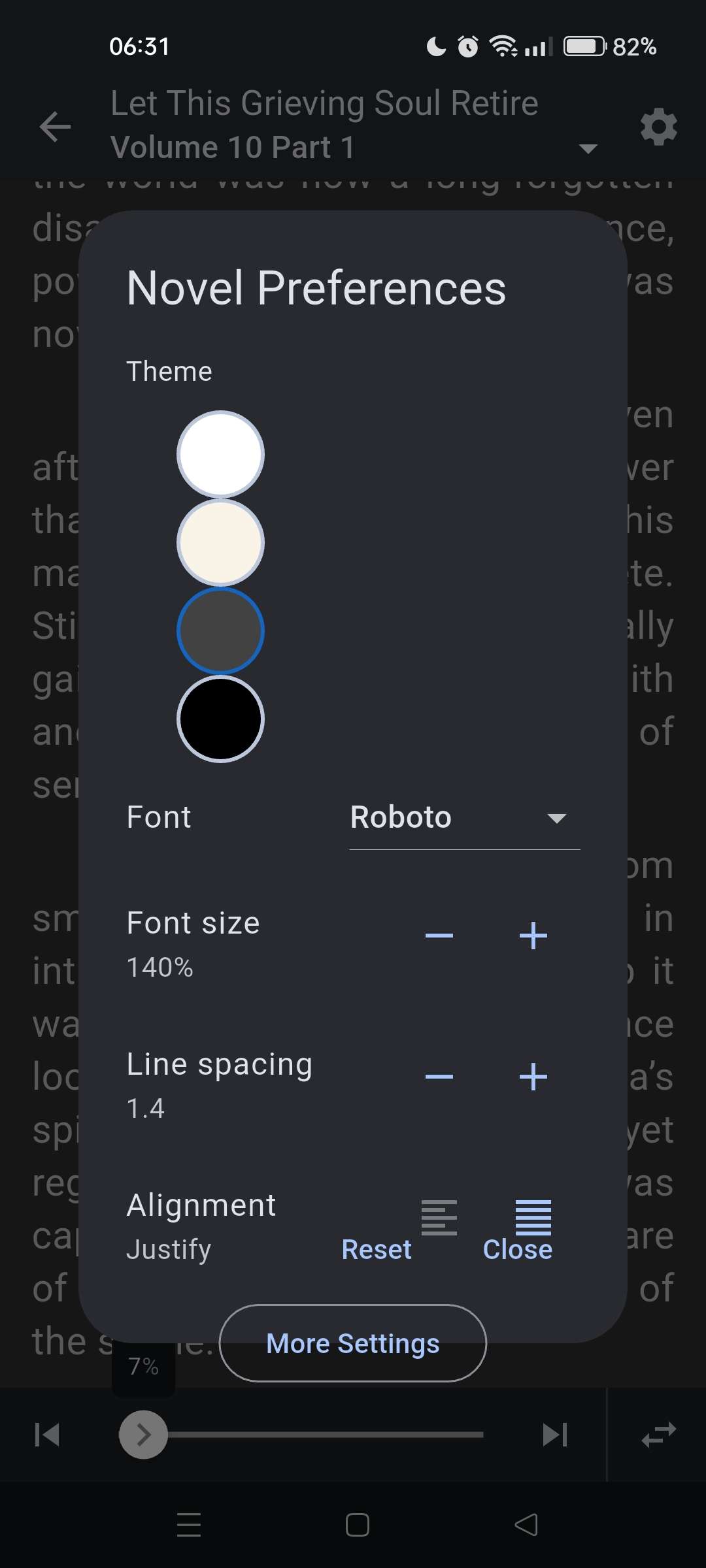
                                          Unusable Alignment option image

                                        • I would like a way to dynamically filter Unread/In Reading/Fully read parts in the Releases tab, if possible.

                                        1 Reply Last reply Reply Quote 0
                                        • NosgorothN
                                          Nosgoroth Premium Member
                                          last edited by

                                          • Novel preferences: themes start too scrolled to the right, text wrapping is messed up, can't scroll the options
                                          • On logout, the screen correctly shows the error, but shows a nonsensical "Retry" button that's just going to fail. Could it be changed to a "Login" button that's takes you to the login page?

                                          Novel preferences popup
                                          Retry logged out error

                                          1 Reply Last reply Reply Quote 1
                                          • 1
                                          • 2
                                          • 18
                                          • 19
                                          • 20
                                          • 21
                                          • 22
                                          • 31
                                          • 32
                                          • 20 / 32
                                          • First post
                                            Last post