New Website Feedback
-
@piisfun Thank you for spotting that, it's been fixed
-
I like the new front page more than the old one. I always found the little releases segment on the old site's front page a bit clunky/not very pretty, so I'd much rather use the full-on calendar. I guess it might be nice to have a section of the main page show all the day's releases in the "scrolling options" pattern that's now used, but that sounds like a hassle to keep updated daily, so I don't mind.
I've been clicking around a bit on both desktop and mobile, so here are my resulting opinions on how the varying platforms could be improved.
General Issues
-
User page: I'd like the "new" books label in the library to lose the marking after seeing them once, or somehow be able to manually remove it. Once I've seen it and know it's there, I don't need to keep being notified of it.
-
Series/Calendar pages: I think I might've said this before, but it would be much nicer and cleaner to have the filters be checkboxes that you can select multiple options from, rather than the "pick one of these sets of options" that it currently is.
- The "Show All" option takes up space being repeated across each filter option, and I also forget its there constantly because it doesn't have a symbol beside it like the other filter options do.
- The "Sort By" segment in Series can't be a checkbox, obviously, so that's fine as is, or it could be a dropdown selector - think AO3, its filter system is wonderful.
- If you really want to keep the "pick one" setup, please have options in Publication Status for "ongoing," "complete and ongoing," and "on hiatus." Though if you were to do checkboxes, you could just have "ongoing, complete, on hiatus" and not have to worry about labeling the various combination options ;)
-
Series: Now that tags are actually searchable rather than just little snippets, I think they should be cleaned up to be useful as tags. Things like "medieval" and "character growth" are good tags; things like "notice me senpai," "slow life," "business acumen" (when "business" is already a tag), etc., not so much.
- It would be good to not only trim down the more 'niche' tags that really only apply to a single series, but also look over the list and consider what are the best tags for things. Like, why is "The Magician Who Rose From Failure" the only series labeled "lore rich"? [cries in Bookworm] It's also the only series labeled "past life," which makes me think tags are being added for newer series that aren't getting added to older ones when applicable.
Desktop-Specific Issues
-
Main page: I think the scrollbars for the book lists could be bigger so they're more readily noticeable. Actually, I'd prefer if I could just click and drag through the books like how I can on mobile, rather than having to use specifically the scrollbar or the arrow options.
- I don't really like the arrows in general, but I think they'd be better placed outside the cover images rather than overlaying them, since currently a mis-click takes you to a new page. It would also increase their clarity. The covers would need to be reduced further to make space on the sides, though.
-
Reader: The black progress/menu bars disappear a bit too fast; if I'm scrolling through the chapter options and accidentally move my mouse outside of the zone, it'll sometimes disappear before I can get it back in.
Mobile-Specific Issues
-
Series/Calendar page: Most of this site's menu bars are on the left hand side (filters on desktop, forum menu on mobile) but these pages' filters for mobile are on the right side of the page, which is unintuitive. The filters button and the pop-out menu should be on the left to line up with everything else.
-
Reader: The reader is somewhat annoying to work through, especially on portrait mode. There is very little room for text due to the browser's natural top and bottom bars, and the site's black progress/menu bars take up even more space on top of that.
-
Reader: Those aforementioned black bars are very hard to make disappear; it seems like I have to tap, and then quickly scroll, to get rid of them. I'd prefer to turn them on/off just by tapping.
EDIT: I thought there was a separate page for new website bugs but it seems they go here.
-
Series page: Marginal Operation isn't showing the bars that indicate parts released, including V7 which is supposedly "currently publishing." Clicking "read preview" will take you to the reader and allow you to go through chapters properly.
-
Main page: The "link" for the Library button is "j-novel.club/user/howitworks," both on the little "hover over" that will pop up when you hover over a link and tell you the address, and on the searchbar once you click the link. It does still take you to the library correctly, and the actual "howitworks" link will take you to its proper link as well... so I guess it's just a visual glitch or something? All the other links look fine.
-
Reader (desktop only):
When I switch to scrolling instead of paginated, a thin black bar appears on the right side of the reader. It disappears and reappears as I switch back and forth.Upon further inspection (aka when it's light out and my laptop's brightness is up) I realize it's a scrollbar; I assume that's what "no light-themed reader interface yet" is referring too since that's part of the interface. But the current dark-mode scroll box is so dark it's practically invisible against the black bar, so it could do with higher contrast for readability.- And if a light-mode reader interface is being added, I do hope that a proper dark-mode reader (black background, white text) is being worked on as well.
-
-
The issue, detailed in this comment, is still present.
Since you intend to shove the new reader down peoples' throats no matter what... let's start listing the problems with it:
It does not support proper portrait mode (already mentioned by @mlindner). The current "portrait" mode looks bad and has objectively worse readability.
It still miscounts pages. In particular, clicking right margin does not navigate to the last page, but using the slider does. Unlike the old reader, which corrects the page count after the last page is reached, the new reader does not — it stays broken even after learning the correct page count.
Popup controls obscure parts of page when they fade in. It is easy to accidentally show them, and top panel contains clickable links, so you can accidentally leave the page by clicking within book margins! The old reader didn't have as many controls, but permanently fixing them at the same position on screen was much better.
The page layout becomes broken after switching between "single page" and "spread" modes.
Unlike in the old reader, there is no way to dim the big-ass "J-NOVEL-CLUB" logo at the top of page. I presume, that hiding that logo while reading in public places was the main feature of "Dim the lights" button. The dark mode in the new reader does a completely different thing.
The last page with next chapter link looks bad. It is clearly unfinished. No wonder, — since you can't even reach it without using the bottom slider.
Vertical scrolling mode looks and works much better than the default horizontal mode (in particular, it does not have problems with counting pages!) — you should probably just make it the default. But it still has the issue with displaying controls on mouse-over.
All of above feedback applies to the desktop site. I haven't really tested mobile version, because it is presently too buggy to use.
-
You know, this transition would probably be a lot smoother if people would stop being so antagonistic in their posts. Instead, let's try leaving meaningful and detailed feedback. Saying something is "bad" is 100% useless. Be very explicit as to what the issue is. More detail is better.
We're all here because we love J-Novel so let's work to make it better. Thanks.
-
@chocolatkey whatever it was, is fixed now..
That's how it looked:
https://drive.google.com/file/d/1KiJKc0OjMLoaoliiak8CsqLIfafAjPYp/view?usp=drivesdk -
@Marius8 It still looks like this for me. Some release links are placed in the divs with id which seem to be supposed to contain the date, and date go into divs with seem supposed to be release links containers instead.
-
On my Samsung tablet i have to turn it sideways to view the calender so the screen fits. Otherwise all the text and options overlap.
Also when i logg in, it results it my keyboard opening up as it wants me to type text
-
@piisfun I am also seeing something similar while using Opera as my browser. Only a few days seem to be affected though. It does somewhat fix itself - if I click on something and then go back to it, the calendar bug disappears (i.e. only when I open it fresh does the bug show).
-
Downloading a book directly from the purchase modal doesn't seem to set whatever flag the "New Books" section on the user library page looks at; it's claiming two books are new that I've already downloaded.
-
On a Series' page, the "Discuss on Forums" link only takes you to the volume 1 topic. I'd prefer there to be a link next to each volume's page leading to the corresponding forum topic, but if that's not possible, at least it'd be better if the main link led to the series landing page on the forum e.g. https://forums.j-novel.club/tags/orphen
-
@Spacebssn So it's acting the exact same way for you? Interesting.
I expect that one to be a hard-to-kill issue.
-
I liked new version the first time. Whatever you did to it inbetween I hate it now.
Edit: Especially the reader. will get used to it I suppose though.Edit 2: And reader is already half broken on my computer so I have to change settings literally every time I open a page.
-
It might be better if clicking the name of a release brings you to the series page, since we already have the green part buttons to bring us to the reader. Right now, unless I'm missing something, I have to go to the series section, then search for the series, then click into it if I want to get there and read a volume summary or preorder a volume.
-
Might I suggest that JNC put MOBI (or other kindle supported format) premiums in the "my library" section in addition to EPUB? I cannot fathom why anyone would pay the same (or more) to purchase a JNC title from amazon vs. using premium credits. The multiple times commenters mention using Calibre to convert formats (and the objections to not doing so, i.e. not owning a PC) make it clear to me that there is 'demand' for having content in a 'direct to kindle-friendly' format.
-
Getting an odd bug in the reader - when I use arrow keys or click to turn the pages, it always skips the last page of the chapter and moves onto the next one. Dragging the slider to the end will make it display the last page, though.
-
@HamsterExAstris Right now, the "new books" is simply based on publication date. In the future, we will store last download status for people as well, to also provide notifications regarding when an update to the EPUB comes out.
@KingKillerX Could you please elaborate on what you liked during the first launch? We haven't made any changes that I think would make it hate-able.
@Jon-Mitchell We will add MOBI support at a later date when the backend is worked on.
@Silverleaf That is a know issue that will be addressed.
-
How do we find the "series id" or "user id" that the RSS feeds rely on? The example provided for bookworm makes it pretty clear that there's no way to figure it out based on usernames or titles.
EDIT: Found the buttons on the user profile and series pages. Not sure how I missed those when I first asked
EDIT2: Yay, they're new. I guess I wasn't blind. -
Can you you put an option to display the book covers in the users library. I liked being able to look at the covers of all the books I've bought and a drop down list with titles only isn't as satisfying.
Also the first volume of My Big Sister Lives in a Fantasy World was mistakenly labeled as
Volume 2: The World's Strongest Little Brother in my user library. -
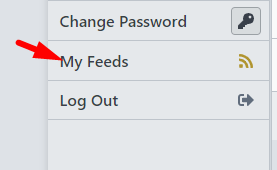
@Vorthod I just added these links that should make it easy for you and others to find the feeds
Series:
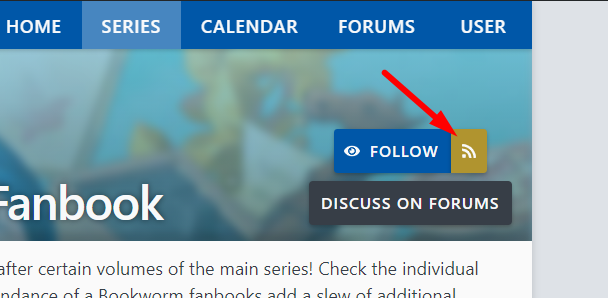
User:
Edit: Also, I apologize to current feed users, the update to the new site's URLs in the feed entries may cause previously read entries to be marked as unread again
-
@chocolatkey I literally just saw those and thought I had somehow been blind this whole time. Thanks =)